

Recipe Cards give you the ingredients, method and allergen information for every dish on the menu, so you can check a dish or answer a guest's question with confidence.
Steps
-
Go to Manage > Facilities & Menu > Recipe Cards.
-
Use the search bar to find a dish, or scroll through the full menu list.
-
Tap the eye icon on a dish to open its recipe card.
-
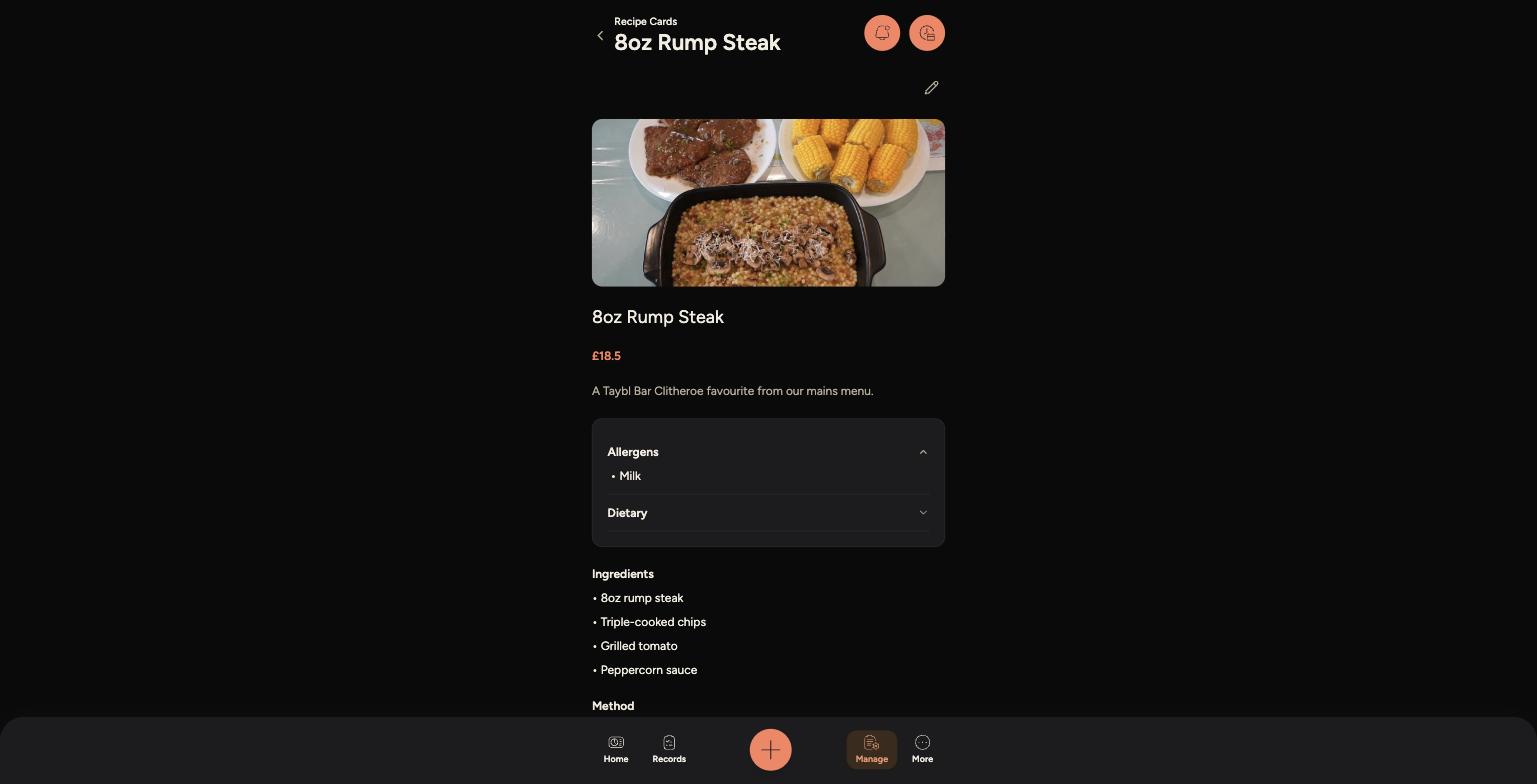
Each card shows a photo, price and description, followed by Allergens and Dietary information.
-
Tap Allergens or Dietary to expand them, then scroll down for the full Ingredients and Method.
A recipe card with allergens expanded
Tips
Always check Allergens before answering a guest's question directly — don't rely on memory for allergen information.
The Method section is a useful refresher if you're covering a dish you don't usually prepare.
If a recipe card looks out of date or wrong, flag it to a manager — recipe cards are edited from the Admin Panel.