

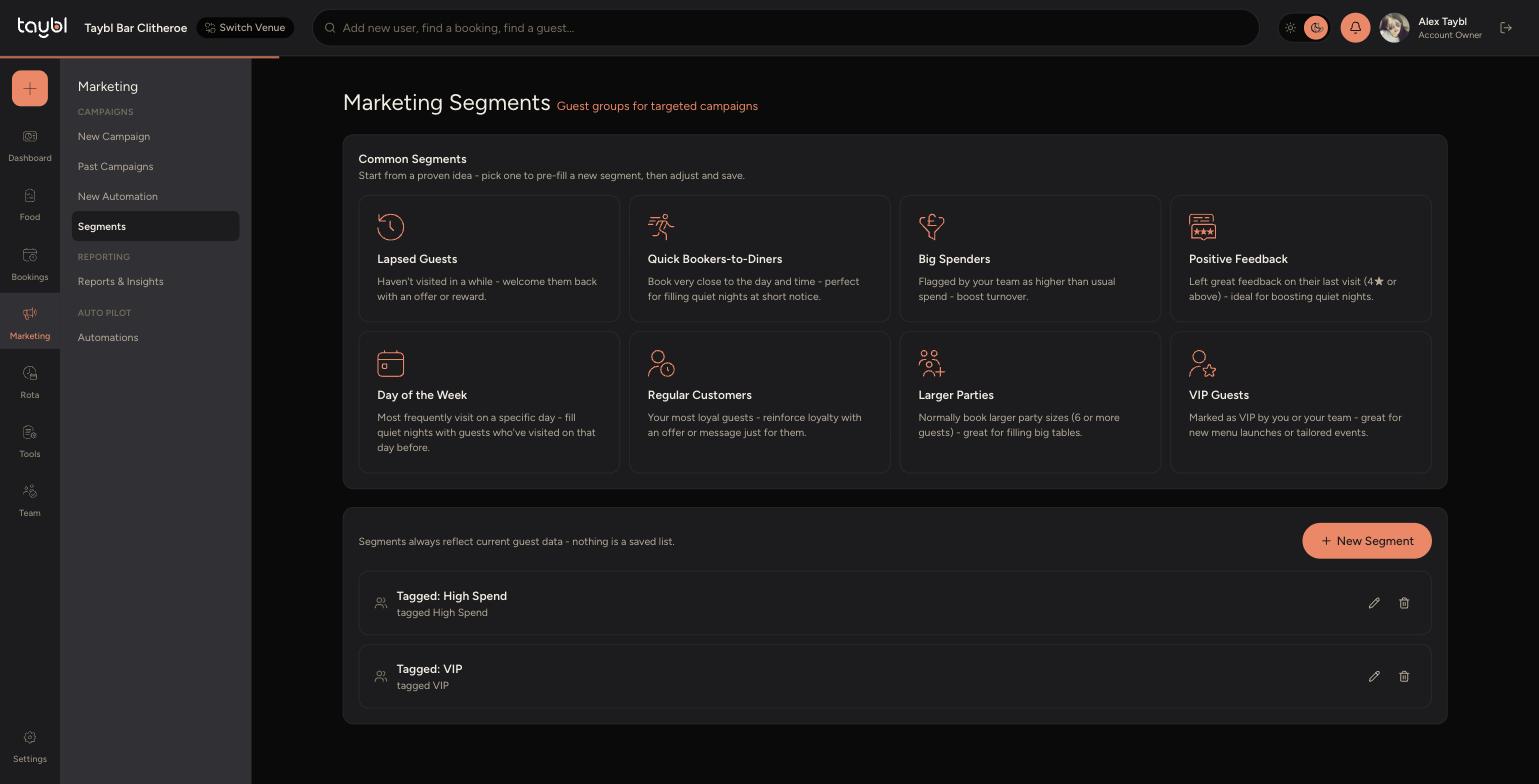
Segments are groups of guests that update automatically, based on their booking history and feedback. Use a Common Segment for a quick start, or build a custom one with your own filters.
Common Segments
Go to Marketing, then "Segments" to see these ready-made options. Click one to pre-fill a new segment with its settings, then adjust and save it as your own.
-
Lapsed Guests - haven't visited in a while, welcome them back with an offer or reward.
-
Quick Bookers to Diners - book very close to the day and time, perfect for filling quiet nights at short notice.
-
Big Spenders - flagged by your team as higher than usual spend, useful for boosting turnover.
-
Positive Feedback - left great feedback on their last visit (4 stars or above), ideal for boosting quiet nights.
-
Day of the Week - most frequently visit on a specific day, fill quiet nights with guests who've visited on that day before.
-
Regular Customers - your most loyal guests, reinforce loyalty with an offer or message just for them.
-
Larger Parties - normally book larger party sizes (6 or more guests), great for filling big tables.
-
VIP Guests - marked as VIP by you or your team, great for new menu launches or tailored events.
Building a Custom Segment
Click "New Segment" on the Segments page to build one from scratch, or start from a Common Segment and adjust it. Give it a Name, then combine as many filters as you like. The "Guests currently matching" count on the right updates live as you adjust filters, so you can see how big the audience is before you save.
Visit Criteria
-
Min. Visits - only include guests with at least this many past visits.
-
Last Visit Before - only include guests whose most recent visit was more than this many days ago, useful for lapsed guests.
-
Last Visit Within - only include guests who have visited in the last set number of days, useful for guests who visited recently.
-
Most Common Day - only include guests whose most frequent visit day matches the one you choose.
-
Avg. Lead Time (days) - only include guests whose average booking-to-visit gap falls within your chosen range, useful for finding guests who book at short notice.
Feedback
-
Exclude Poor Feedback - excludes guests whose most recent feedback was below this rating (1 to 5 stars). Guests who've never left feedback aren't excluded, so this is useful for combining with Lapsed Guests, a win-back send skips anyone whose last visit actually went badly.
-
Recent Positive Feedback - matches guests whose most recent submitted feedback meets both the rating and the days window you set. Unlike Exclude Poor Feedback, a guest with no feedback does not match.
Party Size
-
Avg. Party Size - only include guests whose average party size across all bookings falls within your chosen range.
-
Recent Large Party - matches guests with at least one completed booking of this size or larger, within the given window. Unlike Avg. Party Size, this looks at a single visit rather than the lifetime average.
Customer Insights
-
Regular customers - toggle on to only include guests who count as Regulars. This definition is set venue-wide in Marketing Settings.
-
Lapsed customers - toggle on to only include guests who count as Lapsed. This definition is also set venue-wide in Marketing Settings.
-
Tags - only include guests carrying one of your chosen guest tags, such as Allergy Alert or Birthday Club.
-
When you're happy with the mix, click "Save Segment". It's ready to use straight away as a target Segment on a campaign or automation.